












How to file a reportEnglish


Equipo
 Equipo
Rezzered
Nv 54 · 0 resets
Mensaje inicial de Rezzered
Copiar enlaceThere are two kinds of reports, and each goes to a different place. Read this once and you will get it right the first time.
Cheating or hacking: Discord only, never the forum
Do not post a cheater here. A public topic warns them and gives them time to hide their items.
- Open a ticket on our Discord, in the Report a cheater category.
- Add your proof: a video or clear screenshots.
- Write the character name and the link to their profile, for example
kantru.com/character/Name.
For a long video, upload it to a file sharing site and put the link in the ticket. The team reads every ticket. A banned account can no longer log in, buy or sell characters.
Insults, threats, scams, spam: post a topic in this board
Use this for any other break of the forum rules. One topic per complaint, and one violator per topic. Post it within 3 days (72 hours) of what happened. Older complaints, and complaints that miss a point below, can be closed without a decision.
Step 1: write the title like this
Server / Character name / Rule number
Example: Main / Vesna / 1.2 means the Main server, the player Vesna, rule 1.2. Every rule in the forum rules has a number: find the one that was broken and put it in the title.
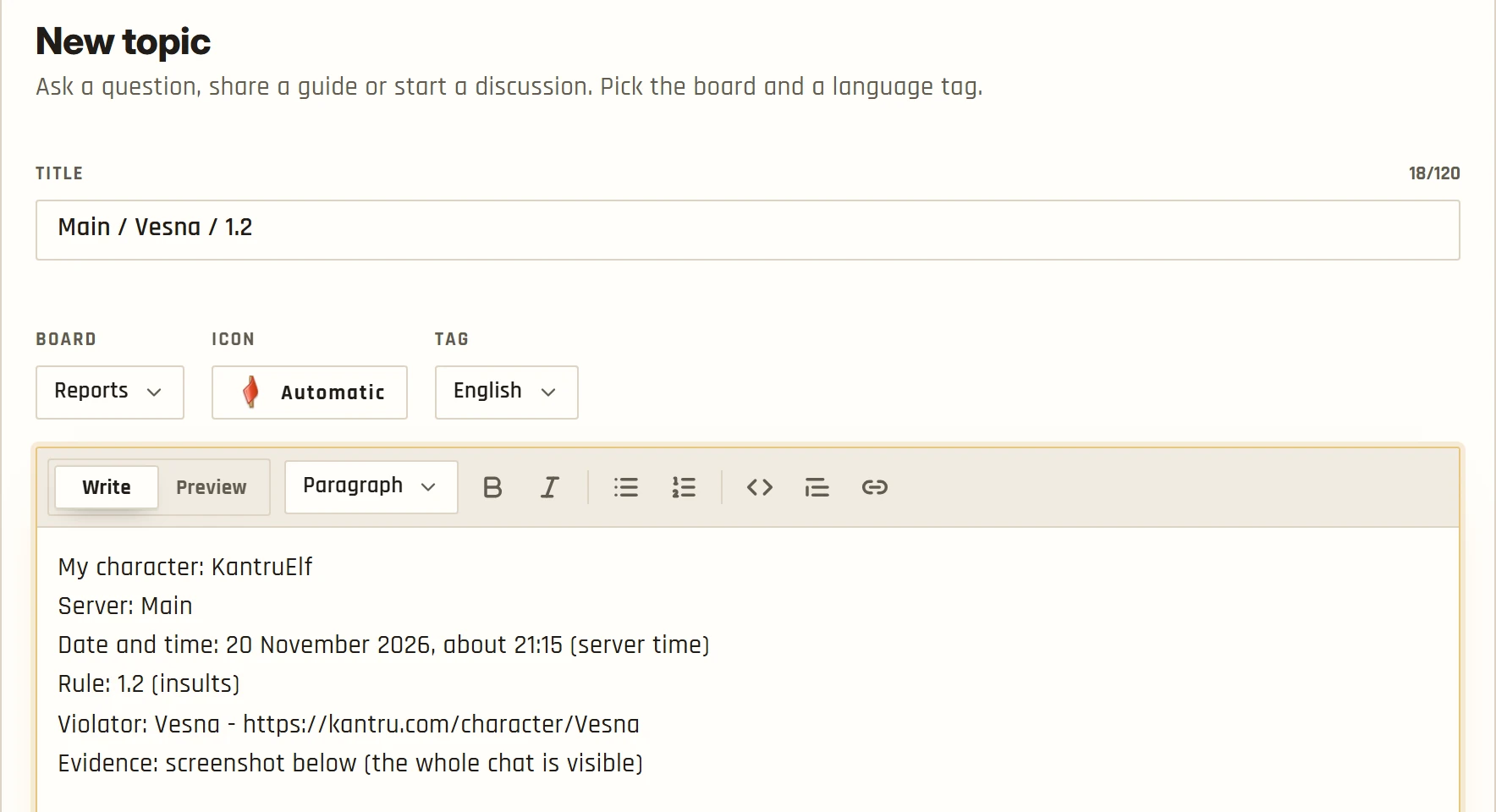
Step 2: copy this into the text and fill it in
My character:
Server: Main or Sub
Date and time: (the exact date and the approximate time)
Rule number:
Violator: (character name and a link to their profile)
Evidence: (a link to your screenshot or video)
The forum cannot show pictures from other sites. Paste the link to your screenshot or video as plain text and the team will open it.
Step 3: make your evidence easy to read
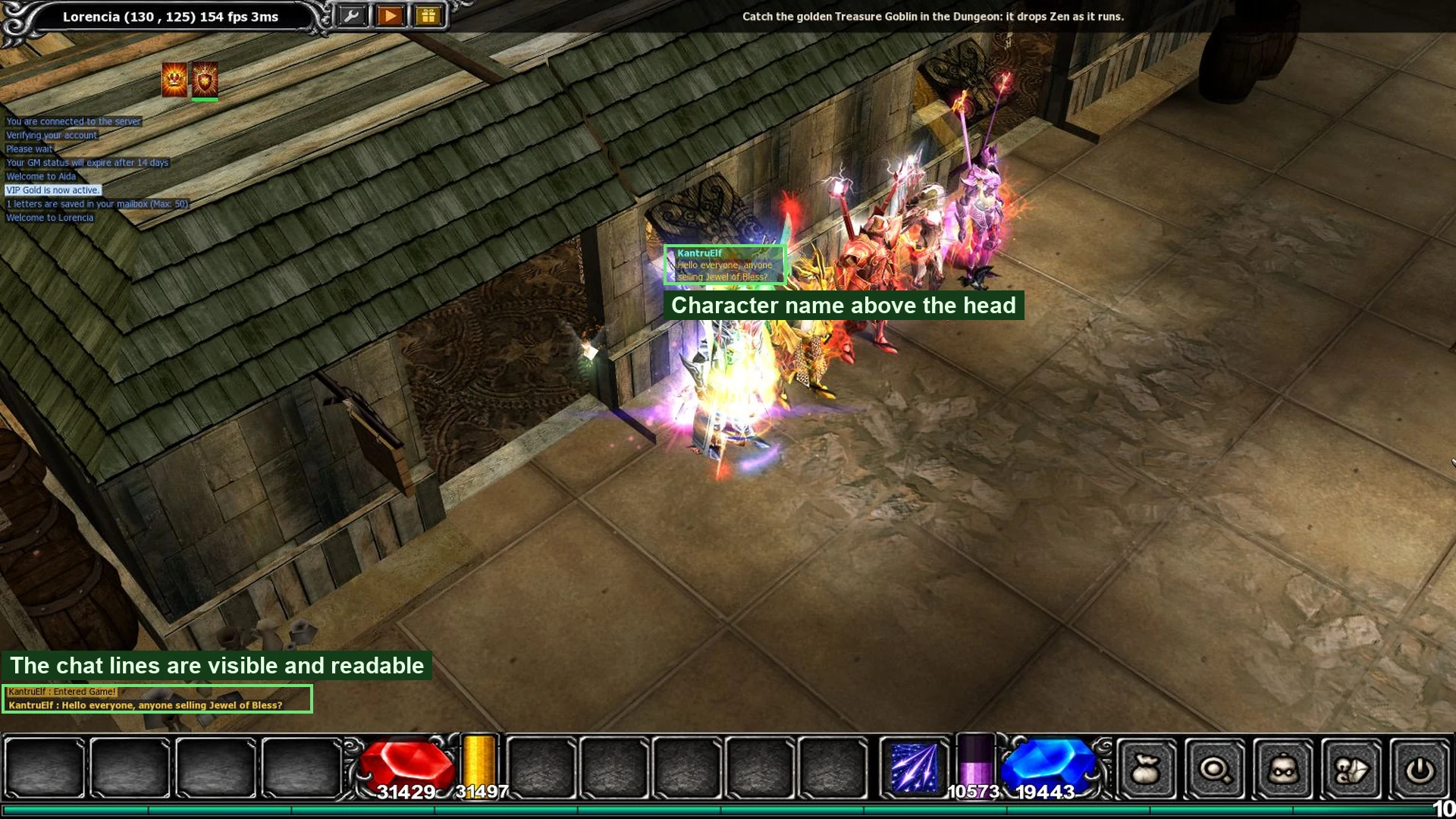
A good screenshot is sharp, shows the whole chat and the violation, and has the character name visible. On Windows, press Shift + Windows + S to capture an area, or Print Screen for the whole screen. A date on the picture helps the team find the moment, but it is not required.
If you record a video:
- The video title matches the topic title.
- The video description has the link to the topic.
- The video is public.
- The system chat with the date and time is visible at the end. Press Print Screen a few times to fill it.
- The text must be readable. Videos with such low quality that the chat cannot be read are not accepted.
If a video proves the violation but breaks points 1 to 3, the team decides what to do with it. If the violation needs no chat to be proven, a short description can replace the evidence.
What happens next
The administration checks reports every day and bans in the game when it is needed. A complaint in the right format is reviewed faster.
- Who is checked: the team may look at the chat around the reported time for everyone in the conflict. Players who broke a rule but were not part of the complaint are usually not punished. In serious cases they can be.
- Replies: each member may post one useful reply per complaint topic. The topic author can reply as often as needed. Flood, insults and repeated messages are a forum mute, see rule 1.6.
- Chat notes: private messages (@) with curse words are not punished, unless they insult family, a moderator or the administration. A complaint about guild chat is judged only when it names a guild member and quotes the insult.